Superheat and Subcooling Calculator
Enter the gauge pressure and line temperature to get superheat or subcooling, or find the target superheat for a piston system.
The superheat calculator is a free tool that works out superheat, subcooling, or target superheat for an HVAC or refrigeration system from gauge and thermometer readings. It runs in your browser, nothing is uploaded, and no sign-up is needed. Pick a mode, and the form shows only the inputs that mode uses.
The refrigerant drop-down covers R-410A, R-22, R-32, R-454B, R-134a, R-404A, R-407C, R-448A, R-290 (propane), R-1234yf and R-507A, so the same tool works for an R-22 or R-410A job. For blends with temperature glide, the calculator picks the correct dew or bubble temperature for you.
Superheat readings suit systems with a fixed orifice (piston). Subcooling readings suit systems with a TXV or EEV. The sections below explain the steps and the principles behind each result.
How to use the superheat calculator
- Choose a mode in the Calculate drop-down: Superheat, Subcooling, or Target superheat (fixed orifice). The form changes to show only the inputs that mode needs.
- If it appears, select your refrigerant in the Refrigerant drop-down.
- For superheat, enter the Suction pressure (at service valve) and pick its unit: psig, psia, kPag, kPaa, barg, bara or MPag.
- Enter the Suction line temperature in °F or °C. Clamp the sensor on the suction line next to the service valve and insulate it.
- For subcooling, enter the Liquid line pressure and the Liquid line temperature.
- For target superheat, enter the Indoor wet-bulb (return air) and the Outdoor dry-bulb.
- Above sea level, open More options and enter the Altitude above sea level in ft or m. Leave it blank at sea level.
- Read the result rows. Only the rows that apply to your mode appear. Check any warning shown below them.
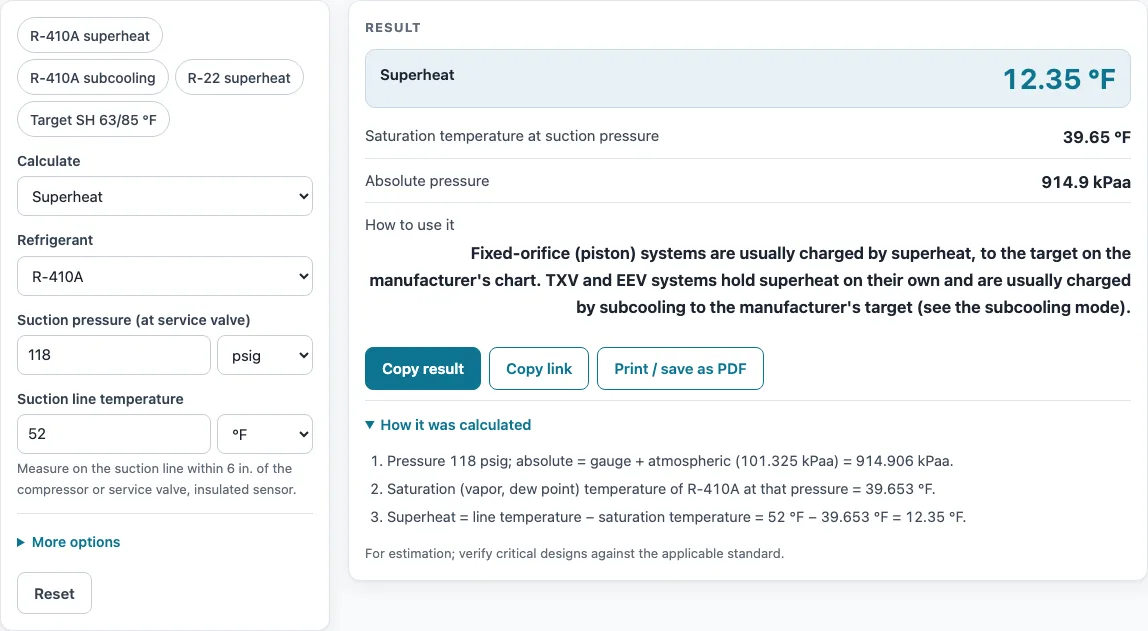
To see the format before entering your own readings, press one of the example buttons above the form: R-410A superheat, R-410A subcooling, R-22 superheat, or Target SH 63/85 °F.
After a result appears, Copy result copies the result lines and a link. Copy link stores every input in the page address, so the same calculation reopens later. Print / save as PDF outputs the inputs, results, steps and date. Reset restores the starting example.
How do you calculate superheat?
Superheat is the suction line temperature minus the saturation temperature at the suction pressure. It shows how much the vapour has warmed after all the liquid has boiled off in the evaporator.
To find the saturation temperature, convert the gauge reading to absolute pressure, then find the temperature at which the refrigerant boils at that pressure. The calculator takes this value from the same pressure-temperature data as the PT chart pages.
Worked example: R-410A at 118 psig, with the suction line at 52 °F. The saturation temperature at that pressure is 39.65 °F, so superheat is 52 − 39.65 = 12.35 °F.
What is the difference between superheat and subcooling?
Superheat measures the vapour on the low-pressure side. Subcooling measures the liquid on the high-pressure side, and it is the saturation temperature at the liquid line pressure minus the liquid line temperature. It shows how far the liquid has cooled below its condensing temperature.
Worked example: R-410A at 340 psig, with the liquid line at 95 °F. The calculator returns 9.607 °F of subcooling, based on a saturation temperature of 104.6 °F.
The metering device decides which reading to use. Fixed-orifice (piston) systems are charged by superheat. TXV or EEV systems are usually charged by subcooling to the manufacturer’s target. Blends with temperature glide use the bubble temperature for subcooling.
How is target superheat worked out?
On a piston system the right superheat changes with the load: a hot, humid day gives a lower target than a mild, dry one. The calculator estimates it as (3 × indoor wet bulb − 80 − outdoor dry bulb) ÷ 2 in °F. With 63 °F wet bulb and 85 °F dry bulb that is (189 − 80 − 85) ÷ 2 = 12 °F. If the formula gives less than 5 °F, the calculator says not to adjust the charge by superheat and to check airflow instead.
Sources
Data and methods used by this calculator (checked October 2026):
- ECM, Super-heat in a fixed orifice circuit (target superheat formula)
- CoolProp equations of state (saturation data)
- NIST Chemistry WebBook, thermophysical properties of fluids (pure refrigerants, checked within 0.05 %)
- Goodman, A1 vs. A2L pressure temperature chart, USA °F/psig (R-22, R-410A, R-32, R-454B)
Worked examples
| Input | Result |
|---|---|
| R-410A, 118 psig, 52 °F | 12.35 °F superheat (saturation 39.65 °F) |
| R-410A, 340 psig, 95 °F | 9.607 °F subcooling (saturation 104.6 °F) |
| R-22, 68 psig, 50 °F | 10.39 °F superheat (saturation 39.61 °F) |
| WB 63 °F, DB 85 °F | 12 °F |
| R-134a, 2 barg, 6 °C | 5.205 °C superheat (saturation 0.7946 °C) |
Calculated by the tool above with these values.
Frequently asked questions
What should superheat be on R-410A?
There is no single correct number. For a fixed-orifice system, the target can be estimated as (3 × indoor wet bulb − 80 − outdoor dry bulb) ÷ 2 in °F, which approximates manufacturers’ charging charts. The unit’s own chart takes precedence.
For example, a wet bulb of 63 °F and a dry bulb of 85 °F give a target of 12 °F.
What does high superheat mean?
High superheat means the vapour leaving the evaporator is much warmer than its boiling point, so the evaporator is not getting enough liquid refrigerant. On a fixed-orifice system, it commonly points to undercharge, a restriction, or low airflow across the evaporator. Confirm the reading before changing the charge.
What does a negative superheat or subcooling result mean?
Negative superheat means the line is colder than the saturation temperature, so liquid is reaching the sensor. This usually comes from flooding, overcharge, or a bad reading. Negative subcooling means the liquid line holds vapour or flash gas, typically from low charge or a restriction.
In both cases, recheck the gauge, the sensor contact and the refrigerant type.
Is there a superheat chart for R-22 or R-410A?
Use the R-22 or R-410A PT chart pages to look up a saturation temperature by hand. Those pages use the same pressure-temperature data as the calculator, so you can check any figure it shows.
Can I charge by superheat in cool weather?
Usually not. The calculator warns when the outdoor dry bulb is below 55 °F or the indoor wet bulb is outside about 50–76 °F, because those readings may fall outside the range your unit’s charging chart covers. Follow the unit’s own instructions, such as weighing in the charge.
Does altitude change the result?
Yes, it can. Gauges read relative to local air pressure, so at altitude the readings need converting to absolute pressure. Enter the altitude under More options in ft or m, and leave it blank at sea level.
Related tools
- Refrigerant PT chart: look up saturation temperatures for several refrigerants when you need a value outside the calculator.
- R-410A PT chart: check R-410A saturation temperatures by hand against a superheat or subcooling result.
- R-22 PT chart: confirm R-22 saturation temperatures on older systems.
- R-454B PT chart: look up dew and bubble temperatures for R-454B, a blend with temperature glide.
- Wet bulb calculator: find the indoor wet-bulb value needed for a target superheat estimate.
- AC size calculator: estimate the cooling capacity a system needs before you check its charge.
- All HVAC calculators: browse the other free calculators on this site.