Psychrometric Calculator
Enter the dry-bulb temperature and one more property to get every moist-air property and see the state on a psychrometric chart.
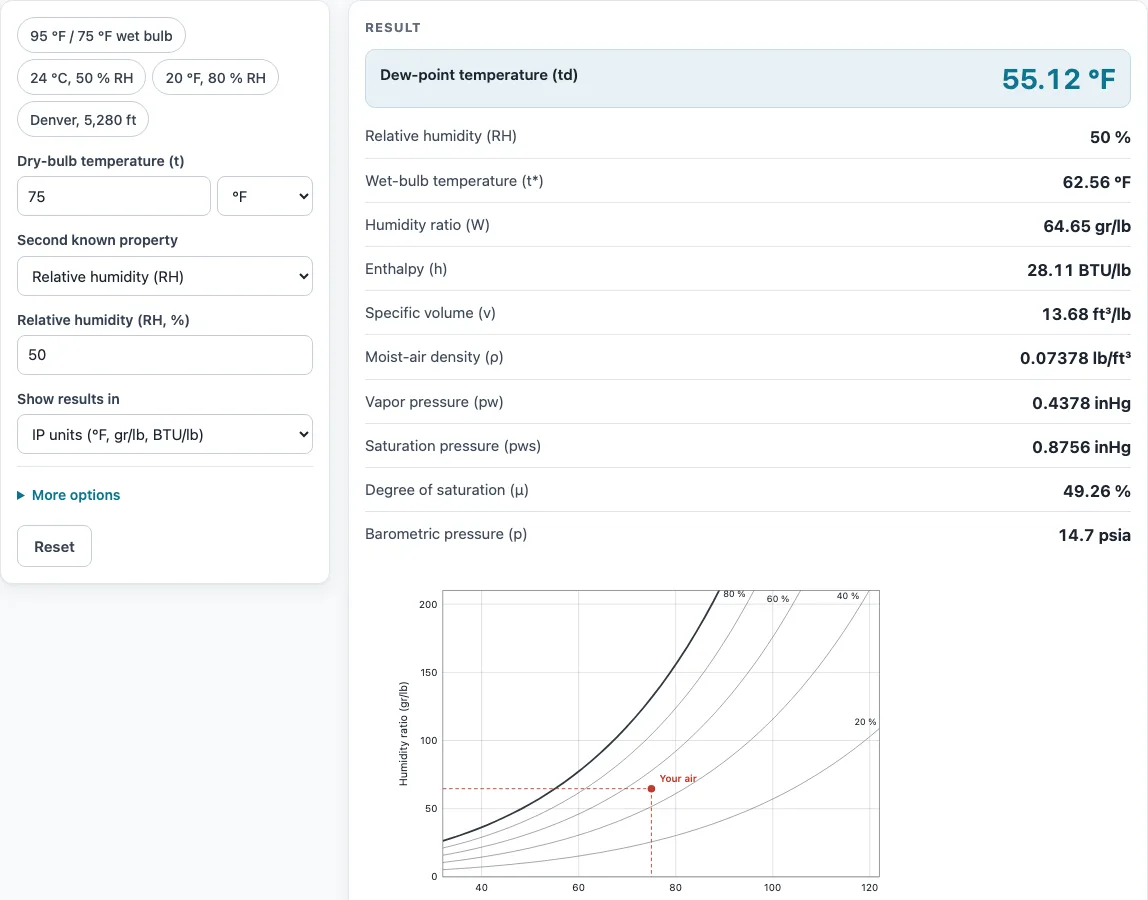
How to use the psychrometric calculator
- Choose Show results in: IP units (°F, gr/lb, BTU/lb) or SI units (°C, g/kg, kJ/kg).
- Enter the Dry-bulb temperature (t) and pick °F or °C.
- In Second known property, choose what else you measured: Relative humidity (RH), Wet-bulb temperature, Dew-point temperature or Humidity ratio (W).
- Enter that value in the field that appears. Humidity ratio can be typed in gr/lb, g/kg, lb/lb or kg/kg.
- Open More options and set Air pressure from to Altitude above sea level (ft or m) or Measured barometric pressure (psia, inHg or kPa). Sea level is the default.
- Read the results: relative humidity, wet-bulb temperature, dew point, humidity ratio, enthalpy, specific volume, density, vapour pressure, saturation pressure and degree of saturation.
- Check the state point on the chart, then open “How it was calculated” to see the formula and each step with your numbers.
For example, a dry bulb of 75 °F at 50 % RH gives a dew point of 55.12 °F, a wet bulb of 62.56 °F and an enthalpy of 28.11 BTU/lb.
Use Copy result to copy the result lines with a link. Copy link saves every input in the page address, so the same calculation opens again later. Print / save as PDF produces a printout with the inputs, results, steps and date. Reset restores the starting example.
What is humidity ratio?
Humidity ratio is the mass of water vapour in a given mass of dry air, written as W. It measures the moisture actually in the air, not how close the air is to saturation, so it does not change when air is heated or cooled without gaining or losing moisture.
The calculator uses this equation from the ASHRAE Handbook—Fundamentals, chapter 1:
W = 0.621945 × pw / (p − pw)
Here pw is the vapour pressure of the water in the air and p is the total pressure of the moist air. The result is shown in grains per pound (gr/lb) or grams per kilogram (g/kg). There are 7,000 grains in 1 pound, so a value in gr/lb divided by 7,000 gives pounds of water per pound of dry air.
Pressure appears in the equation, so the humidity ratio depends on altitude. The section on altitude below explains why.
What is enthalpy of air?
Enthalpy of air is the total heat content of moist air per unit mass of dry air. It has two parts: sensible heat, which you can measure with a thermometer, and latent heat, which is carried by water vapour. A change in either temperature or moisture changes the enthalpy.
The calculator uses this equation from the same ASHRAE chapter:
h = 1.006 t + W (2501 + 1.86 t) kJ/kg
Here t is the dry-bulb temperature in °C and W is the humidity ratio in kg/kg. The first term, 1.006 t, is the sensible part. The second term, W (2501 + 1.86 t), is the latent part. The result is shown in kJ/kg or BTU/lb of dry air.
Saturation vapour pressure, which feeds into the humidity ratio, is calculated with the Hyland–Wexler equation from the same source. For example, 24 °C at 50 % RH gives an enthalpy of 47.81 kJ/kg.
Sources
Data and methods used by this calculator (checked October 2026):
Worked examples
| Input | Result |
|---|---|
| Dry bulb 75 °F, RH 50 % | RH 50 %, dew point 55.12 °F, wet bulb 62.56 °F, h = 28.11 BTU/lb |
| Dry bulb 95 °F, wet bulb 75 °F | RH 39.8 %, dew point 66.75 °F, wet bulb 75 °F, h = 38.31 BTU/lb |
| Dry bulb 24 °C, RH 50 % | RH 50 %, dew point 12.95 °C, wet bulb 17.07 °C, h = 47.81 kJ/kg |
| Dry bulb 20 °F, RH 80 % | RH 80 %, dew point 15.4 °F, wet bulb 18.56 °F, h = 6.634 BTU/lb |
| Dry bulb 75 °F, RH 50 %, altitude 5280 ft | RH 50 %, dew point 55.12 °F, wet bulb 61.72 °F, h = 30.31 BTU/lb |
| Dry bulb 30 °C, dew point 20 °C | RH 55.1 %, dew point 20 °C, wet bulb 22.94 °C, h = 67.75 kJ/kg |
Calculated by the tool above with these values.
Frequently asked questions
How do you use a psychrometric chart?
A psychrometric chart plots each state of moist air as one point. Enter the dry-bulb temperature and one more property, and the calculator places the point on the chart against the saturation curve and the RH lines. Moving horizontally from the point to the saturation curve gives the dew point, because the humidity ratio stays the same while the air cools.
How does altitude change psychrometric properties?
At higher altitude the air pressure is lower. At 5,280 ft the standard pressure is about 12.1 psia instead of 14.7. The same temperature and RH therefore give a higher humidity ratio. In the first worked example, 75 °F at 50 % RH at 5,280 ft gives a wet bulb of 61.72 °F and an enthalpy of 30.31 BTU/lb, compared with 62.56 °F and 28.11 BTU/lb in the default example. Set the altitude or pressure under More options.
Is the result accurate enough for a final design?
The results are for estimation. Verify critical designs against the applicable standard before you rely on them.
Can I use the results in a quote or report?
Yes. Results, charts and printouts can be used freely in commercial work such as quotes, proposals, reports and service records. You do not need to give attribution.
Does the tool store or send my numbers?
No. Everything runs in your browser, nothing is uploaded, and no sign-up is needed. Your inputs stay in the page address only if you use Copy link.
Related tools
- Dew point calculator: use it when you only need the dew point from temperature and humidity.
- Wet bulb calculator: use it when you need the wet-bulb temperature on its own.
- CFM calculator: use it to work out airflow in cubic feet per minute.
- Chiller tonnage calculator: use it to estimate the cooling capacity a chiller needs.
- BTU calculator: use it to estimate heating or cooling load in BTU.
- Duct size calculator: use it to size ductwork for a given airflow.
- All HVAC calculators: use it to browse every calculator on the site.