Dew Point Calculator
Enter the air temperature and relative humidity to get the dew point, or work back from a dew point to the humidity.
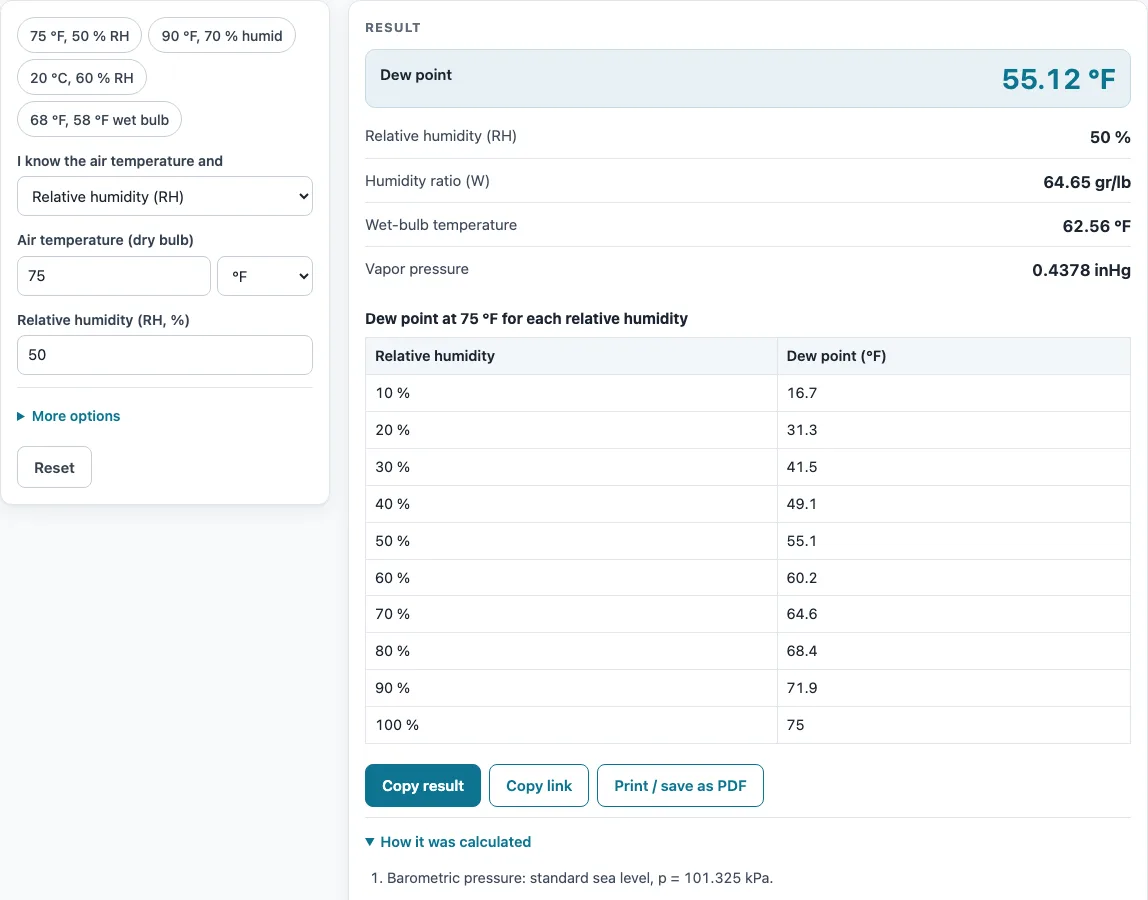
How to use the dew point calculator
- Open the drop-down labelled “I know the air temperature and” and choose Relative humidity (RH), Wet-bulb temperature, or Dew point (find RH). The form then shows only the inputs that mode needs.
- Type the air temperature in “Air temperature (dry bulb)” and select °F or °C.
- Fill in the second reading:
- In RH mode, enter “Relative humidity (RH, %)”.
- In wet-bulb mode, enter “Wet-bulb temperature” from a psychrometric (sling or aspirated) reading, not a globe or natural wet-bulb reading.
- In dew point mode, enter “Dew point”. Below 0 °C (32 °F), enter the frost point.
- If the site is not near sea level, open “More options” and enter “Altitude above sea level” in ft or m.
- Read the result rows. Only the rows that apply to your mode appear. If a warning appears above the results, read it before you use the numbers.
- Open “How it was calculated” to see the formula and every step with your own values.
- To test the tool, press an example button. For instance, 75 °F with 50 % RH gives a dew point of 55.12 °F.
Use Copy result to copy the result lines with a link to the calculation. Use Copy link to save the page address, which stores every input so the same calculation reopens later. Print / save as PDF prints the inputs, results, steps and date. Reset restores the starting example.
How do you calculate dew point?
To compute dew point or determine dew point from a reading, you need the air temperature and the amount of water vapour in the air, usually given as relative humidity. This calculator uses the ASHRAE Handbook—Fundamentals psychrometric equations, with the Hyland–Wexler saturation pressure, and shows the Magnus formula as a cross-check.
The Magnus formula is:
Td = b·γ / (a − γ), where γ = ln(RH/100) + a·T / (b + T)
Here T is the air temperature in °C, RH is the relative humidity in %, a = 17.625 and b = 243.04 °C. At 20 °C and 60 % RH, γ is about 0.829 and the dew point is about 12.0 °C, which matches the 12.01 °C the calculator gives.
What is the difference between dew point and relative humidity?
Dew point is the temperature to which air must be cooled, at constant pressure and moisture content, to become saturated at 100 % relative humidity. Relative humidity tells you how close the air is to saturation at its current temperature.
The two values differ because the dew point depends only on how much water vapour the air holds, while relative humidity also depends on the air temperature. Warm air can hold more vapour, so the same dew point gives a lower RH at a higher temperature. For example, 68 °F air with a wet-bulb reading of 58 °F has a dew point of 51.15 °F and an RH of 54.8 %.
What dew point is comfortable?
The U.S. National Weather Service describes dew points of about 55 °F (13 °C) or lower as dry and comfortable, 55–65 °F as becoming sticky, and above 65 °F (18 °C) as muggy or oppressive.
Sweat evaporates more slowly in moist air, so high dew points make a given air temperature feel hotter. Dew point also stays steadier through the day than relative humidity, which rises and falls as the temperature changes.
Can the dew point be higher than the temperature?
No. The dew point can equal the air temperature, which happens at 100 % RH, but it cannot be higher. If your inputs give a dew point above the air temperature, check the units and the mode you chose.
What is a dew point chart?
A dew point chart is a table or grid that gives the dew point for an air temperature at each relative humidity, so you can read the value without calculating it. The calculator’s table shows the dew point at your temperature for each RH.
Charts are useful for condensation risk. A surface colder than the dew point gets condensation, such as cold-water pipes, ducts in hot attics and windows in winter. HVAC designers check duct and pipe insulation against the dew point. Altitude barely changes the dew point, so a chart made for sea level is still a good guide at most elevations.
Sources
Data and methods used by this calculator (checked October 2026):
- ASHRAE Handbook—Fundamentals 2017, ch. 1 Psychrometrics
- Alduchov & Eskridge (1996), improved Magnus form (a 17.625, b 243.04 °C)
- U.S. National Weather Service, dew point vs humidity
Worked examples
| Input | Result |
|---|---|
| Air 75 °F, RH 50 % | Dew point 55.12 °F (RH 50 %) |
| Air 90 °F, RH 70 % | Dew point 78.89 °F (RH 70 %) |
| Air 20 °C, RH 60 % | Dew point 12.01 °C (RH 60 %) |
| Air 68 °F, wet bulb 58 °F | Dew point 51.15 °F (RH 54.8 %) |
| Air 25 °C, dew point 15 °C | RH 53.8 % |
Calculated by the tool above with these values.
Frequently asked questions
Are the results accurate enough for a design?
The results are for estimation. Verify critical designs against the applicable standard.
What does a frost point mean?
Below 0 °C (32 °F), the result is the frost point. It is the temperature at which frost forms, calculated over ice rather than over water.
Does altitude change the dew point?
Hardly. Altitude lowers the air pressure, which changes the humidity ratio and wet bulb at the same RH. The dew point calculated from temperature and RH barely changes.
Can I use the results in a quote or report?
Yes. Results, charts and printouts can be used freely in commercial work such as quotes, proposals, reports and service records. No attribution is needed.
How do I compute dew point from a wet-bulb reading?
Choose Wet-bulb temperature in the first drop-down, then enter the dry-bulb and wet-bulb readings from a sling or aspirated psychrometer. The calculator solves the psychrometric equation for the humidity, then the dew point: 68 °F with a 58 °F wet bulb gives a dew point of 51.15 °F and 54.8 % RH.
Is my data uploaded anywhere?
No. Everything runs in your browser and nothing is uploaded. There is no sign-up, and the tool is free.
Why don’t I see every result row?
The rows depend on the mode you chose. Only the results that apply to that mode are shown.
Related tools
- Wet bulb calculator: use it when you have a wet-bulb reading and need the wet-bulb temperature from other inputs.
- Psychrometric calculator: use it when you need the full set of moist-air properties, not just the dew point.
- CFM calculator: use it to work out airflow when sizing or checking a system.
- BTU calculator: use it to estimate the heating or cooling load of a space.
- Duct size calculator: use it to size ducts for a required airflow.
- Superheat calculator: use it to check superheat on a refrigeration or air-conditioning system.
- All HVAC calculators: use it to browse every calculator on the site.