Chiller Tonnage Calculator
Enter the chilled-water flow and temperatures, or a process load, to get the chiller size in tons, BTU/h and kW.
The chiller tonnage calculator works out how many tons of cooling a chilled-water or process loop needs, based on flow and temperatures or on product mass flow and temperature drop. It runs in your browser, is free, and needs no sign-up. You can choose from three modes: load from water flow and temperatures, load from product mass flow, or required flow for a known load.
Each result shows the chiller capacity in tons, the cooling load in BTU/h and kW, and the flow per ton. You can enter metric units such as L/s, m³/h and °C. Results are for estimation, so verify critical designs against the applicable standard.
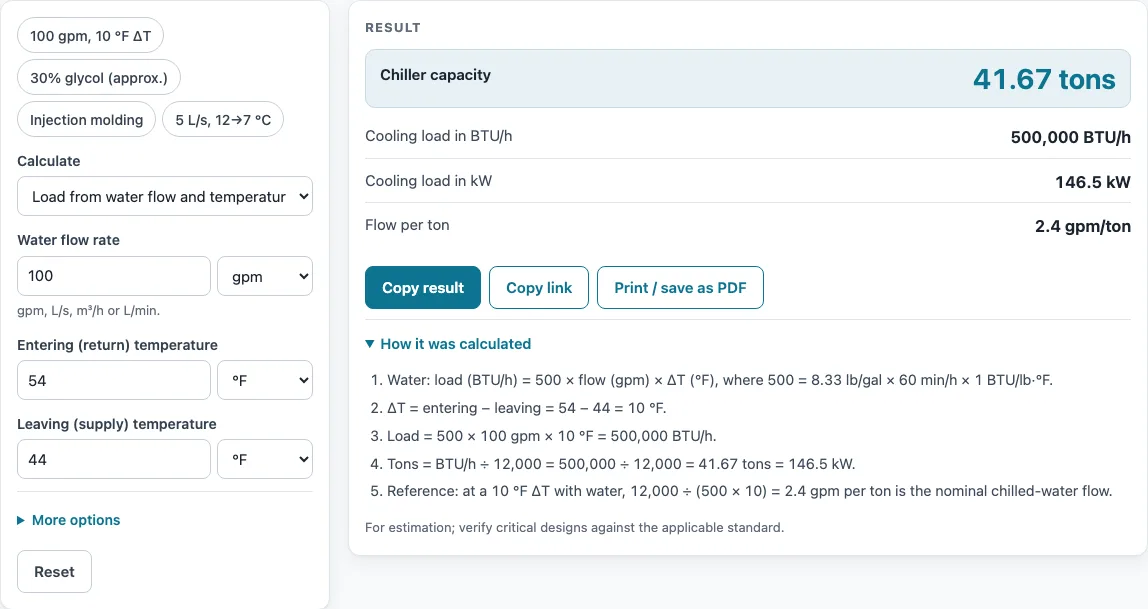
How to use the Chiller Tonnage Calculator
- Open the Calculate drop-down and choose a mode: Load from water flow and temperatures, Load from product mass flow, or Required flow for a known load.
- For water loops, enter the Water flow rate and pick its unit: gpm, L/s, m³/h or L/min.
- Enter the Entering (return) temperature and the Leaving (supply) temperature, using °F or °C. If your mode shows the Water temperature difference (ΔT) field instead, enter return minus supply, such as 10 °F.
- For process cooling, enter the Product mass flow (lb/h or kg/h), the Product specific heat (cp), and the Product temperature drop (ΔT).
- For a known load, enter the Cooling load in tons, BTU/h or kW.
- Optionally, enter a Safety factor (%). Leave it at 0 for no margin.
- Under More options, change the Fluid specific heat (cp) and Fluid specific gravity only for glycol or another fluid. Water uses 1.0 for both.
- Read the result lines, then check the “How it was calculated” section, which lists every step with your numbers.
The example buttons above the form fill in sample inputs, which is a quick way to see how the fields fit together. Reset restores the starting example. Copy result copies the result lines with a link, Copy link stores every input in the page address so the calculation reopens later, and Print / save as PDF produces the inputs, results, steps and date.
How do you calculate chiller tonnage?
For water, multiply the flow in gpm by the temperature difference in °F, then divide by 24. The result is tons of cooling: tons = gpm × ΔT (°F) ÷ 24. Here ΔT is the entering (return) temperature minus the leaving (supply) temperature.
For example, 100 gpm with 54 °F in and 44 °F out gives a 10 °F difference. That is 100 × 10 ÷ 24 = 41.67 tons, or 500,000 BTU/h (146.5 kW).
What is the formula for chiller capacity?
Chiller capacity starts with heat flow in BTU/h: BTU/h = 500 × gpm × ΔT. Then divide by 12,000, since 1 ton = 12,000 BTU/h. The constant 500 comes from 8.33 lb per gallon × 60 minutes per hour × 1 BTU/lb·°F, the specific heat of water.
In metric units, kW = flow (kg/s) × 4.186 × ΔT (K), and 1 ton = 3.517 kW. For example, 5 L/s with 12 °C in and 7 °C out gives 29.72 tons, or 356,600 BTU/h (104.5 kW).
How many GPM per ton of chilled water?
Flow per ton equals 24 divided by the ΔT in °F. A common chilled-water design uses 44 °F supply and 54 °F return, a 10 °F ΔT, which gives 2.4 gpm per ton.
A wider ΔT needs less flow. For example, 240 gpm with 56 °F in and 44 °F out is a 12 °F ΔT and delivers 120 tons, which is 2 gpm per ton. Going the other way, 100 tons at a 10 °F ΔT needs 240 gpm (15.1 L/s).
How do I size a process chiller?
Start with the process load: load = mass flow × specific heat × temperature drop. For example, 200 lb/h of product with a specific heat of 0.5 BTU/lb·°F and a 300 °F drop gives 30,000 BTU/h, or 2.5 tons.
Designers usually add a margin for future load and fouling, which you can enter as a safety factor. If the process fluid is a glycol mixture, use the specific heat and specific gravity from the fluid supplier’s data, because glycol carries less heat per gallon than water.
Sources
Data and methods used by this calculator (checked October 2026):
Worked examples
| Input | Result |
|---|---|
| 100 gpm, 54 °F in, 44 °F out | 41.67 tons (500,000 BTU/h, 146.5 kW) |
| 240 gpm, 56 °F in, 44 °F out | 120 tons (1.44 × 10⁶ BTU/h, 422 kW) |
| 5 L/s, 12 °C in, 7 °C out | 29.72 tons (356,600 BTU/h, 104.5 kW) |
| 200 lb/h at 0.5 BTU/lb·°F, ΔT 300 °F | 2.5 tons (30,000 BTU/h, 8.792 kW) |
| 100 tons at ΔT 10 °F | 240 gpm (15.1 L/s) |
Calculated by the tool above with these values.
Frequently asked questions
Why does the calculator show a warning or a zero load?
A warning appears when the entering temperature is not above the leaving temperature. That means the water is not being cooled, so the load is zero or negative. Check that the return and supply values are in the right fields. A temperature difference above 30 °F also triggers a warning, because chilled-water loops normally run with a much smaller ΔT.
Can I use the calculator with glycol?
Yes. Open More options and change the Fluid specific heat (cp) and Fluid specific gravity to match the glycol mixture. Use the fluid supplier’s data for those values.
Can I use the results in a quote or report?
Yes. Results, charts and printouts may be used freely in commercial work such as quotes, proposals, reports and service records, and no attribution is needed. Still, verify critical designs against the applicable standard.
What does the safety factor do?
The safety factor adds a percentage margin on top of the calculated load. Leave it at 0 if you do not want any margin.
Is my data uploaded anywhere?
No. Everything runs in your browser, nothing is uploaded, and there is no sign-up.
Related tools
- BTU to kW converter: use it when you need to convert a cooling load between BTU/h and kW.
- AC size calculator: use it when you are sizing air conditioning for a space.
- Boiler size calculator: use it when you need to size a boiler rather than a chiller.
- Psychrometric calculator: use it when you need air properties such as humidity and enthalpy.
- CFM calculator: use it when you need to work out airflow in cubic feet per minute.
- Refrigerant PT chart: use it when you need pressure and temperature values for a refrigerant.
- All HVAC calculators: use it to browse every calculator on the site.